calvarytechsolutions
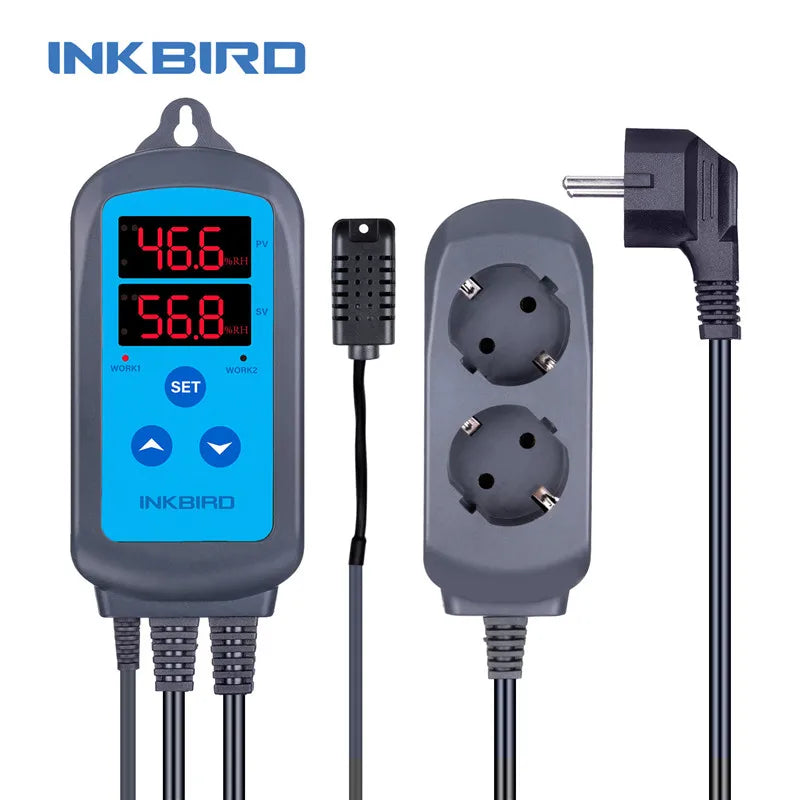
INKBIRD IHC-200 Pre-wired Digital Dural Stage Humidity Controller
INKBIRD IHC-200 Pre-wired Digital Dural Stage Humidity Controller
Couldn't load pickup availability
SPECIFICATIONS
Key Specifications & Features
Here are the main specs and capabilities:
-
Power Input: 100-240 VAC, 50/60 Hz.
-
Max Output Current: rated for 10 A (or some specs say up to 12 A for each relay) at 100-240 VAC.
-
Power Consumption: < 3 W.
-
Humidity Measuring Range: from ~ 5 % RH to 99.99 % RH.
-
Humidity Control Range (Set‐point range): ~ 5 % to 99 % RH.
-
Accuracy: ±3 % RH (in typical operating range) for many models.
-
Sensor cable length: about 2 m (~6.56 ft) for the humidity probe.
-
Dimensions: Main unit ~ 140 × 68 × 33 mm (~5.5×2.7×1.3 in).
-
Ambient Operating Temperature: –30 °C to +75 °C (–22 °F to 167 °F).
-
Key Features:
-
Dual display: one shows current humidity (PV), one shows set/humidity target (SV).
-
Automatic mode switching between humidification / dehumidification based on differential settings.
-
Set differential/hysteresis values for humidifier and dehumidifier (so you don’t get rapid cycling).
-
Calibration of sensor/humidity measurement (“CA” setting) to correct offsets.
-
Delay protection: prevents the device from switching too rapidly (especially useful for compressors/dehumidifiers).
-
Alarm capability: high/low humidity thresholds and sensor fault alarms.
-
⚙ How It Works / Typical Setup
-
You mount or place the sensor/probe in the area whose humidity you want to control (make sure it is well‐exposed and not directly in a humidifier stream). Some users report condensation around the probe can give wrong readings.
-
You set a target humidity value (HS) in the menu. Then you set the humidification differential (HD) and dehumidification differential (DD). For example: Target = 60 % RH; HD = 5 % → humidifier turns ON when RH ≤ (HS − HD) = 55 %. Similarly, if RH ≥ (HS + DD) it triggers dehumidifier.
-
The controller will monitor the humidity and engage the appropriate relay (humidifier or dehumidifier/fan) to bring the humidity into that band.
-
You can optionally set high/low alarm values so that if humidity gets dangerously too high/low, the device alarms. You can also calibrate the reading if you find the probe is off by a known amount.
-
The device is plug-and-play for many uses: you connect the humidifier to one outlet, the dehumidifier/fan to the other outlet (depending on your needs). One Reddit user explained that the two sockets are labelled “Work 1” and “Work 2” and answered:
“Work 1: controls the humidifier; Work 2: controls the dehumidifier (which in your case is a fan).”
👍 Strengths / What It's Good At
-
Very cost‐effective way to automate humidity control in environments where consistent humidity is important (e.g., terrariums, drying rooms, mushrooms, greenhouses).
-
Dual mode (humidify + dehumidify) is flexible — you don’t need separate controllers for each.
-
Calibration and differential settings help customise the behaviour to your specific environment and equipment.
-
Wide input voltage range (100-240 VAC) means it works in many regions.
-
Good accuracy for many general uses (±3 % RH) and good ranges.
-
Moderate size and easy to integrate into existing setups; many plug‐in prewired versions available (makes setup simpler).
-
Strong community feedback that many users get decent performance. For example:
“Inkbird is quality. … the only thing is make sure the humidifier is automatically on when it’s plugged in.”
🧭 Suitability / Use-Case Scenarios
Here are some scenarios where the IHC-200 makes sense — and where you might reconsider.
Good fit if you:
-
Are running a small to medium humidity‐sensitive enclosure (greenhouse, terrarium, incubator, curing box, mushroom fruiting chamber) and want automated control rather than manual switching.
-
Have separate humidification and dehumidification devices (e.g., a fogger/humidifier + fan or dehumidifier) and want one controller to manage both.
-
Want a reasonably accurate, cost-effective humidity controller without getting into industrial price range.
-
Want something fairly straightforward to install and configure.
May reconsider or upgrade if you:
-
Need highly precise humidity control with extremely low tolerance (for instance, scientific labs or archival safe-rooms) — may need more advanced sensors or controller with logging/feedback.
-
Your humidifier/dehumidifier draws very high current (significantly above the relay rating), or you need very large commercial scale control.
-
Want built-in data logging, remote monitoring, alerts beyond simple high/low alarms (unless you go for WiFi version).
-
Your humidifier has built-in control/humidistat interfering, or you need more complex multi-zone/programmable control.
-
Have tricky sensor placement requirements (very wet or condensation‐prone environment) where the standard sensor might not perform ideally without additional protection/airflow.
🔍 Tips for Installation & Use
-
Sensor placement: Put the humidity probe in a representative location (not too close to humidifier output, not in a stagnant corner or extreme airflow). Avoid direct spray or mist hitting the probe.
-
Calibration: If you suspect the reading is off (compare with a reference hygrometer), use the “CA” (calibration) parameter to offset the reading by ± up to ~10 % RH in many units.
-
Set differential values: Don’t just set a target HS; also set the humidification differential (HD) and dehumidification differential (DD) so you have hysteresis — avoids rapid on/off cycling of equipment.
-
Delay protection: Use the PT (delay) parameter if controlling a compressor/dehumidifier to avoid short cycling.
-
Choose the right plug/socket variant: The IHC-200 comes in US, EU, UK, AU plug/socket variants — depending on your region.
-
Check load ratings: Ensure your attached humidifier/dehumidifier/fan do not exceed the rated current of the unit (10A/12A) especially on startup surge. If they do, use a contactor or separate relay.
-
Maintain ambient conditions: The ambient operating temperature range is wide, but humidity around the unit (especially the sensor) ideally should be within spec (avoid extremely saturated probe area, condensation, direct water spray).
-
Setup alarms: Use the AH (alarm high) and AL (alarm low) settings to create safety alerts if conditions go outside of what you consider safe.
-
If using the WiFi version: Make sure your WiFi is 2.4GHz (most units don’t support 5GHz) and you understand the app features, network reliability, etc.
The INKBIRD IHC-200 is very good value for what it does. If you’re controlling humidity in a fairly typical setup (greenhouse, grow tent, incubator, terrarium, curing box) and don’t need ultra-premium specs, then it’s likely a solid choice.
Share